
Scroll cloth walkthrough
How the ScrollImage and ScrollHTML demo draws three scenes into page elements on one canvas: a hue ripple on an image, an image hung as cloth, and a live HTML form on the same cloth.
Open the demo → · Source on GitHub
The page is ordinary HTML: a column of sections, each with a panel and some text. Two panels hold an <img> and one holds a form. A single ScrollRenderer canvas sits over the page and draws a scene into each panel as it scrolls past. The first scene is a ScrollImage whose shader shifts the hue around the cursor. The second hangs the image as a cloth, simulated on the CPU, that you can grab and that swings as you scroll. The third does the same to the form with ScrollHTML, which uses an experimental browser API to draw HTML into a texture. The code is in scroll-image-cloth/index.js, with the shaders beside it.
One canvas for the page
const scrollRenderer = new ScrollRenderer({
  rendererProps: { antialias: true }
})
Object.assign(scrollRenderer.canvas.style, {
  position: 'fixed',
  top: '0',
  left: '0',
  width: '100%',
  height: '100%',
  pointerEvents: 'none',
  zIndex: '1'
})
document.body.appendChild(scrollRenderer.canvas)

const { gl } = scrollRenderer
pointerEvents: 'none' lets clicks and scrolling pass through to the page underneath. Every scene is made with the renderer's gl, added with addScene, and the loop starts with scrollRenderer.playing = true at the end of the file. Each frame, the renderer reads every visible scene's element position, updates its uniforms and draws it. Scroll-synced scenes and ScrollRenderer cover the renderer itself.
Scene 1: a hue ripple
A scene needs an element to follow and a scene graph to draw. Here the element is the <img>, and the graph is a Drawable with one full-size Plane under it:
const drawable = new Drawable(gl)
const scene = new ScrollImage({ gl, element: imgEl, scene: drawable })

const u_mouse = new Uniform({
  name: 'u_mouse',
  value: [-2, -2],
  kind: 'float_vec2'
})
scene.uniforms.u_mouse = u_mouse

new Mesh(gl, {
  geometry: new Plane(gl, { width: 2, height: 2 }),
  program: new Program(gl, {
    vertex: hueVert,
    fragment: hueFrag,
    uniforms: { ...scene.uniforms },
    depthTest: false
  })
}).setParent(drawable)
ScrollImage uploads the image as a texture and adds u_image and u_imageSize to the scene's uniforms, alongside the u_time, u_resolution and u_origin every scroll scene has. Adding u_mouse to scene.uniforms before spreading them into the program means the program holds the same Uniform the pointer handler writes to.
By default a scene locks the viewport to its element, so clip space is the element. A 2 × 2 plane covers it exactly, and hue.vert passes the positions straight through, with no camera. The <img> itself is hidden from the pointer, so the demo listens on its panel and writes the pointer as uvs, or [-2, -2] when it leaves.
hue.frag turns the colour around the grey axis with Rodrigues' rotation, which changes the hue without changing the brightness, by an angle that ripples out from the pointer:
vec3 hue_shift(vec3 c, float angle) {
  const vec3 k = vec3(0.57735);
  float co = cos(angle);
  return c * co + cross(k, c) * sin(angle) + k * dot(k, c) * (1.0 - co);
}
Scene 2: an image as cloth
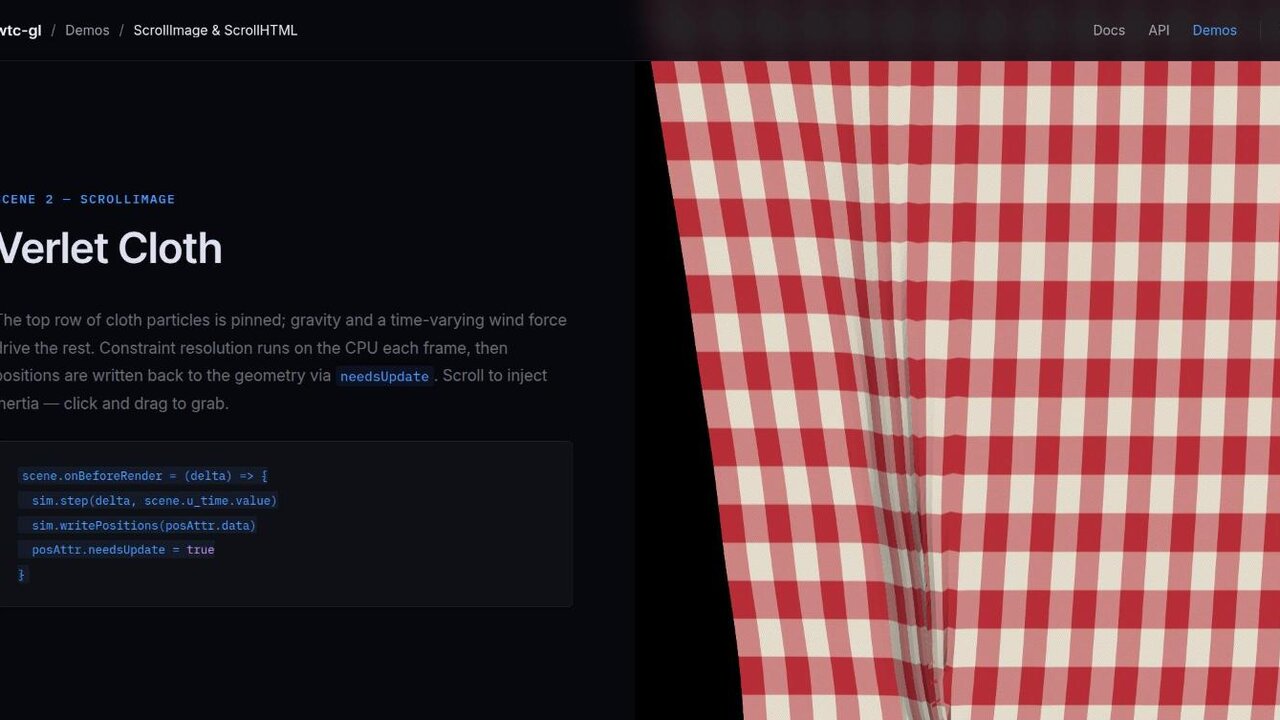
The cloth is a grid of 61 × 45 particles in a small Verlet simulation, ClothSim. Each particle remembers its last position, and its velocity is the difference. The top row is pinned. Each step adds damping, a little wind that varies over the cloth and time, and gravity; then ten passes nudge neighbouring particles back within a minimum and maximum distance of each other, so the cloth can bunch up but not stretch.
The simulation works in the element's own space, from −1 to 1 on each axis, which is also how the plane is laid out. That makes drawing it a matter of copying positions into a plane with one vertex per particle. The plane's vertices run in the same order as the particles, rows from the top, so the copy is direct:
const geo = new Plane(gl, {
  width: 2,
  height: 2,
  widthSegments: COLS,
  heightSegments: ROWS
})
const posAttr = geo.attributes.position

scene.onBeforeRender = (delta) => {
  const scrollImpulse = scrollAccum * 2e-5
  scrollAccum = 0
  sim.step(Math.min(delta, 32), scene.u_time.value, scrollImpulse)
  sim.writePositions(posAttr.data)
  posAttr.needsUpdate = true
}
onBeforeRender runs immediately before the scene draws, and only while its element is on screen, so the simulation pauses off screen for free. needsUpdate re-uploads the attribute; see Geometry and attributes. Scrolling adds up the distance scrolled since the last frame, and the step subtracts it from each particle's previous position, which reads as a sudden velocity: the cloth swings as the page moves.
Drawing outside the element
A hanging cloth swings past the edges of its image, so this scene doesn't lock the viewport to the element or clip to it:
const scene = new ScrollImage({
  gl,
  element: imgEl,
  scene: drawable,
  useViewport: false,
  clipToViewport: false,
  elementSpace: true
})
The viewport is then the whole canvas, and cloth.vert places the plane itself. elementSpace: true adds u_elementSize, the element's size in canvas clip space, and u_origin.zw is the element's centre there:
vec2 canvas_pos = position.xy * (u_elementSize * 0.5) + u_origin.zw;
gl_Position = vec4(canvas_pos, 0.0, 1.0);
The plane runs from −1 to 1, so it's scaled by half the element's size to fill it.
Shading the folds
There are no normals to light the cloth with. Instead, cloth.frag measures how squashed the texture is on screen. The derivatives of the uvs give the area of texture each pixel covers; flat cloth covers a known amount, and folds cover more, so they're darkened:
vec2 dx = dFdx(v_uv);
vec2 dy = dFdy(v_uv);
float jac = abs(dx.x * dy.y - dx.y * dy.x);
float expectedJac = 1.0 / max(u_resolution.x * u_resolution.y, 1.0);
float compression = jac / max(expectedJac, 1e-12);
float fold = 1.0 - smoothstep(1.0, 4.0, compression) * 0.45;
Grabbing
A pointerdown inside a cloth's element converts the pointer to the same −1 to 1 space, finds the nearest unpinned particle within reach and holds it at the pointer until release. No raycast is needed, because the simulation and the pointer share a flat space.
Scene 3: HTML as cloth
ScrollHTML takes an element to follow, element, and an element to draw, htmlElement. It moves htmlElement into a <canvas layoutsubtree> of its own, which lays out the HTML inside it, and uses drawElementImage to draw it into that canvas whenever the browser paints it. The canvas becomes the u_html texture. This is the HTML-in-Canvas proposal: at the time of writing it needs Chromium with chrome://flags/#canvas-draw-element turned on. Without it the uniforms exist, but the texture stays empty.
const scene = new ScrollHTML({
  gl,
  element: panelEl,
  htmlElement: htmlEl,
  scene: drawable,
  useViewport: false,
  clipToViewport: false,
  elementSpace: true
})
The cloth is the same as in scene 2, with html-cloth.frag reading u_html instead of u_image. The rest of this scene is about keeping the form usable:
- Moving the form out leaves the panel empty, and at narrow widths it collapses. A hidden placeholder with the form's 4:3 aspect ratio holds its size.
- The capture canvas,
scene.captureCanvas, is placed exactly over the panel every frame and made almost transparent, atopacity: 0.001, with pointer events on. It still paints, so its paint events keep firing, and the form inside it can be clicked. - Elements inside a
layoutsubtreecanvas can't be focused from script, so the demo makes an off-screen proxy for each field. A click on the cloth works out which field's particles are under the pointer and focuses its proxy, and typing in the proxy copies the value back to the real field, where the next capture picks it up.
WARNING
ScrollHTML depends on an experimental API that may change or never ship. Treat it as a look at what's coming, and keep anything important readable without it.
See also
- Scroll-synced scenes, for scenes, uniforms and the scene options
- ScrollRenderer, for the renderer recipe
- Images that ripple on scroll, for a smaller
ScrollImageeffect - useScrollImage, for the same in React
- API:
ScrollRenderer,ScrollScene,ScrollImage,ScrollHTML,Drawable