
Icon swarm walkthrough
How the icon swarm demo loads icons from glTF, draws every copy of an icon in one call, moves them with physics, and shadows them onto a backdrop that's only the shadow.
Open the demo → · Source on GitHub
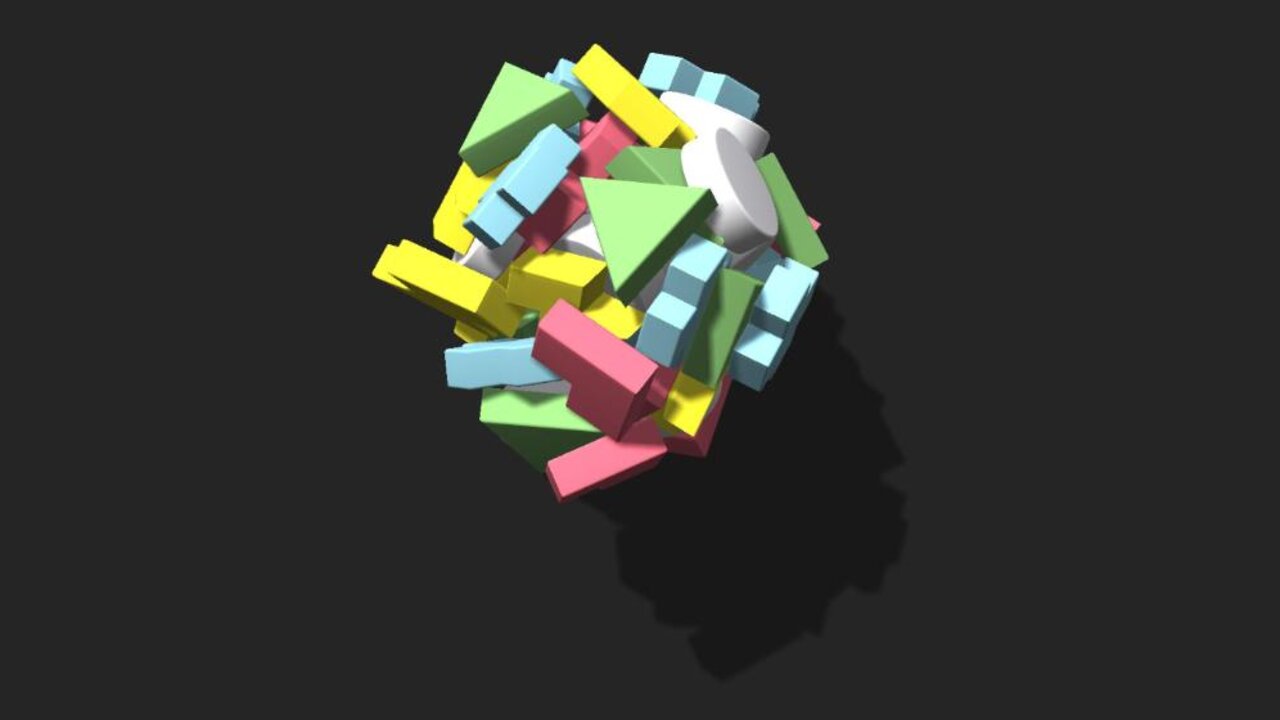
Five icons drip in from outside the view and clump in the middle. Move the pointer through them and they're pushed aside; click and they're blasted apart, then drift back. The rendering is wtc-gl: GLTFLoader, InstancedMesh, Shadow and Raycast. The physics is Rapier, in icon-swarm/physics.js, which knows nothing about wtc-gl. icon-swarm/index.js joins the two.
Icons from Blender
Each icon is a .glb with one bevelled mesh to draw and a few convex pieces for the physics, made in Blender. The pieces are told apart by custom properties, which glTF exports as extras on each node. The loader doesn't copy extras onto the objects it makes, but gltf.json.nodes[i] and gltf.nodes[i] share an index, so the demo reads one and takes the other:
const gltf = await GLTFLoader.load(gl, url, { lights, shadow })
let render = null
const hulls = []
gltf.json.nodes.forEach((node, i) => {
  if (node.extras?.role === 'render') render = gltf.nodes[i]
  else if (node.extras?.collider === 'convex') {
    // No transforms on the pieces: their vertices are in the icon's space
    hulls.push(gltf.nodes[i].geometry.attributes.position.data)
  }
})
Passing lights and shadow to the loader gives every material it turns into a LitProgram the scene's lights, and makes it receive the shadow. The collider meshes are never drawn: only their vertex positions are kept, as point clouds for Rapier. See Extras.
All five icons and the physics engine load at once with Promise.all. A failure shows a message in the corner rather than leaving a blank page.
One InstancedMesh per icon
Up to 120 copies of each icon can be on screen. Rather than a mesh each, every icon becomes one InstancedMesh built from the render node's geometry and the program the loader made for it:
const { geometry, program } = render
program.instanced = true
const mesh = new InstancedMesh(gl, {
  geometry,
  program,
  count: MAX_COUNT,
  // The light camera and this one would cull differently, re-uploading
  // the instances twice a frame. They're all in view anyway.
  frustumCulled: false
})
mesh.count = 0
mesh.setParent(swarm)
Setting program.instanced recompiles the loader's program to read a matrix (and colour) per instance. count: MAX_COUNT sets the capacity, and mesh.count = 0 draws none of them yet; spawning raises it one at a time. So the whole swarm is five draw calls, plus five for the shadow map.
Culling is off for the reason in the comment. With it on, each instance is tested against the camera every time the mesh is drawn, and the ones in view are packed into the buffer. The shadow map draws the mesh from the light's camera too, which would pack a different set and upload the buffer twice a frame. See Culling.
Physics
createPhysics makes a Rapier world with no gravity and returns a small API: addBody, removeBody, explode and step. Each body gets one convex-hull collider per piece from the .glb:
const colliders = hulls.map((points) => {
  const desc = RAPIER.ColliderDesc.convexHull(points)
  if (!desc) throw new Error('convex hull failed')
  return world.createCollider(
    desc
      .setDensity(1)
      .setRestitution(CONFIG.restitution)
      .setFriction(CONFIG.friction),
    body
  )
})
Before each step, every body gets two impulses. One pulls it towards the origin like a spring, capped at maxPull so stragglers don't slingshot through the clump. The other pushes it away from the closest point on the pointer's ray, falling off with the square of the distance, so everything under the cursor moves whatever its depth. A click calls explode, which kicks bodies outward from a centre, harder the closer they are, with a random tumble.
The loop steps the physics at a fixed 60 Hz with an accumulator, at most three steps a frame, and drops the backlog if it falls behind. The rendering runs every frame regardless.
From bodies to instances
After the steps, each body's position and rotation become its instance's matrix. The rotation arrives as a quaternion, which the demo writes into one reused Mat4 column by column, so nothing is allocated per icon:
const p = live[i].body.translation()
const { x, y, z, w } = live[i].body.rotation()
matrix.a11 = 1 - 2 * (y * y + z * z)
matrix.a12 = 2 * (x * y + w * z)
matrix.a13 = 2 * (x * z - w * y)
// ...the other two columns
matrix.a41 = p.x
matrix.a42 = p.y
matrix.a43 = p.z
mesh.setMatrixAt(i, matrix)
Each icon keeps a live list of its bodies, and instance i is body i, so a respawn only has to empty the lists and set count back to 0. New icons come from a shuffled bag of the five, refilled when empty, so the mix stays even.
Framing
The camera is a plain Camera on the z axis, pointing at the origin. On resize, the demo estimates the radius of the settled clump from the icon count, since volume grows with the count, and backs the camera off until the clump fills a set share of the shorter side of the window. Icons spawn on a ring a little outside what that camera sees, so they always drip in from the edges.
A backdrop that's only the shadow
The icons cast onto each other through their LitPrograms. They also cast onto a backdrop behind them, which has no colour of its own: it's black, as opaque as the shadow is dark, so the page's background shows wherever there's no shadow. It's a Program of its own, using shadowShading, the GLSL LitProgram uses for its shadow lookup:
const backdropProgram = new Program(gl, {
  vertex: /* glsl */ `...`,
  fragment: /* glsl */ `#version 300 es
    precision highp float;
    ${shadowShading}
    uniform float u_opacity;
    in vec4 v_shadowCoord;
    out vec4 colour;
    void main() {
      colour = vec4(0.0, 0.0, 0.0, (1.0 - shadowFactor(v_shadowCoord)) * u_opacity);
    }`,
  uniforms: {
    ...shadow.uniforms,
    u_opacity: new Uniform({
      name: 'u_opacity',
      value: CONFIG.look.shadow,
      kind: 'float'
    })
  },
  transparent: true,
  depthWrite: false
})
shadowFactor is 0 in shadow and 1 in the light. Spreading shadow.uniforms into the program gives it the shadow map and matrix, shared with every receiver. The vertex shader works out the shadow coordinate from the world position, pushed out along the plane's normal by the normal bias against shadow acne. The plane faces the camera, so the normal is +z:
vec4 world = u_modelMatrix * vec4(position, 1.0);
vec3 offset = vec3(0.0, 0.0, u_shadowNormalBias);
v_shadowCoord = u_shadowMatrix * vec4(world.xyz + offset, 1.0);
The Shadow follows the scene's lights and casts from every mesh under the swarm node, every drawn instance included:
const shadow = new Shadow(gl, {
  lights,
  mapSize: 2048,
  softness: CONFIG.look.softness
})
shadow.add(swarm)
Its map covers a sphere of radius size around the origin. On resize, the demo sets size to reach the corners of the backdrop the camera can see, so no shadow is cut off at the edge of the map. Shadows covers the area, the bias settings and softness, and A glTF model with shadows puts a loaded model on a shadow catcher.
The pointer
A Raycast is cast from the camera through the pointer every frame the pointer is over the canvas. The physics doesn't need hits for the push, only the ray, so the demo hands it the raycast's own origin and direction vectors, which update in place on each cast:
const raycast = new Raycast()
const ray = { origin: raycast.origin, dir: raycast.direction }
A click does look for a hit. intersectMeshes(swarm) walks the swarm and tests every instance of every InstancedMesh against the source geometry moved by its matrix, so the blast centres on the icon you clicked. On a miss, it centres on the point of the ray closest to the origin, the middle of the clump:
const [hit] = raycast.castMouse(camera, pointer.ndc).intersectMeshes(swarm)
if (hit) blastCentre.resetToVector(hit.point)
else {
  const { origin: o, direction: d } = raycast
  const t = -(o.x * d.x + o.y * d.y + o.z * d.z)
  blastCentre.reset(o.x + d.x * t, o.y + d.y * t, o.z + d.z * t)
}
physics.explode(blastCentre, motionScale)
With prefers-reduced-motion, motionScale is 0.4, so the icons arrive slower and the push, blast and tumble are gentler.
The loop
sync()
scene.updateMatrixWorld()
shadow.render({ scene, update: false })
renderer.render({ scene, camera })
Spawning and stepping come first, then sync writes the instance matrices. The world matrices are updated once for both passes, and the shadow map is drawn before the scene that samples it.
See also
- glTF models, for what the loader makes and how materials map
- Instancing, for capacity,
countand per-instance colours - Shadows, for casters, receivers and shadows in your own shaders
- Raycast, for picking instances
- API:
GLTFLoader,InstancedMesh,Shadow,shadowShading,Raycast